Custom filesystem receiver for Alfresco

It’s really a long time since my last Alfresco post on this blog. And because of that I’d like to announce my comeback to Alfresco developing, because the year with mainly Android coding was long enough. Before that I’ve been working on content publisher for custom CMS based on Alfresco repository, which was able to … Pokračovat ve čtení „Custom filesystem receiver for Alfresco“

It’s really a long time since my last Alfresco post on this blog. And because of that I’d like to announce my comeback to Alfresco developing, because the year with mainly Android coding was long enough. Before that I’ve been working on content publisher for custom CMS based on Alfresco repository, which was able to publish through NATed networks.

My solution is based on Broker, which provides communication between publisher and endpoints, which both may be behind NAT. Each endpoint is subscribed to queue on broker and when request for publish comes, it locally compares published version and if published is newer, it sends request for content and content is transfered. Depublishing works the same way, data consistency is secured by ‚sync‘ mechanism – endpoint may send local file list to publisher, which checks its integrity and do appropriate actions.
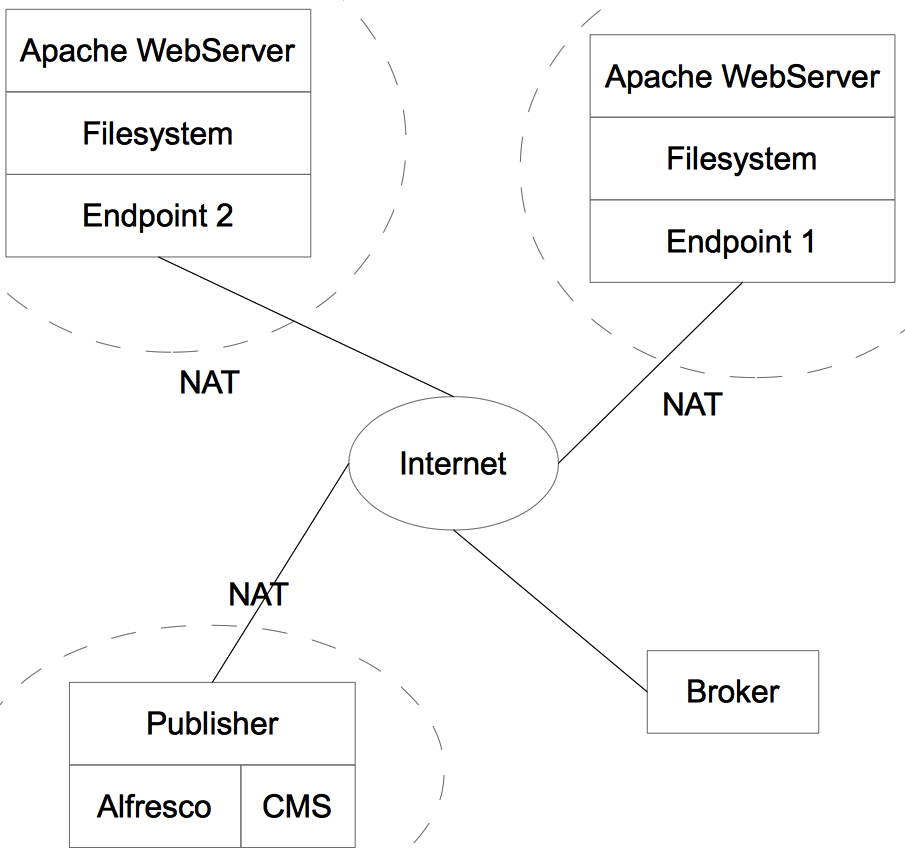
Publisher/endpoint scheme

First version was based on RabbitMQ and HSQLDB and had a lot of performance and security issues, but as I said – I’d like to resurrect it now, rewrite and open source it. I just need to be sure that there is no such a project, because I don’t want to do the same thing. If anyone knows similar stuff, please let me know!
Howto clear defaults to get Fake Camera running again

Quick note: please use Google plus community for asking a questions. I like to read reviews of my applications on Google Play, especially those with suggestions and questions :). Last few days I’m getting more and more questions like this one for Fake Camera Won’t open on kik When I tried to send a pic … Pokračovat ve čtení „Howto clear defaults to get Fake Camera running again“

Quick note: please use Google plus community for asking a questions.

I like to read reviews of my applications on Google Play, especially those with suggestions and questions :). Last few days I’m getting more and more questions like this one for Fake Camera

Won’t open on kik When I tried to send a pic as a live pic from the gallery it took me to the regular camera and didn’t give me the option to choose the app or the regular camera.

or this one

Fake Camera does not work for me, you sucks!

So because of that I’m going to write a step by step how to clear defaults and let camera picker appear again, because that is the main reason of those problems. We’ll start quickly, I just want to say following at the beginning: If this work for you, don’t forget to change your rating and review on Google Play!!!!

If you accidentally selected „Use as default“ checkbox in Camera picker, it’s possible to revert this, Just follow these steps:

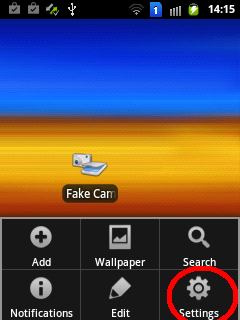
Open phone settings
Open phone settings
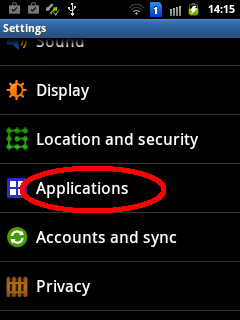
Choose "Applications"
Choose „Applications“
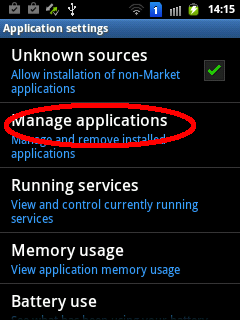
Then "Manage applications"
Then „Manage applications“

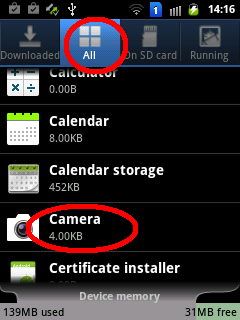
And now comes the tricky part: in application list select that app, which opens automatically instead of camera picker, in my case it’s standard Camera app:

In All apps select Camera application
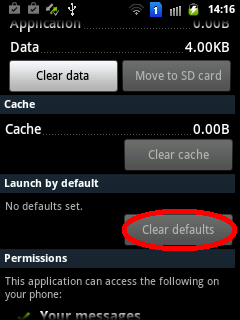
Tap "Clear defaults" button and confirm
Tap „Clear defaults“ button and confirm

And we are done for now, camera picker dialog should appear instead of default selected application. Please note that this has nothing to do with inapp camera some applications may use – that’s impossible to fake.

One more time – if your Fake Camera works again, don’t forget to change your rating and review on Google Play, thank you! And, of course, if you’d like to say thanks for Fake Camera, just buy a Donate Version, or send me some bitcoins or so. Thank you!