It’s really a long time since my last Alfresco post on this blog. And because of that I’d like to announce my comeback to Alfresco developing, because the year with mainly Android coding was long enough. Before that I’ve been working on content publisher for custom CMS based on Alfresco repository, which was able to … Pokračovat ve čtení „Custom filesystem receiver for Alfresco“
It’s really a long time since my last Alfresco post on this blog. And because of that I’d like to announce my comeback to Alfresco developing, because the year with mainly Android coding was long enough. Before that I’ve been working on content publisher for custom CMS based on Alfresco repository, which was able to publish through NATed networks.
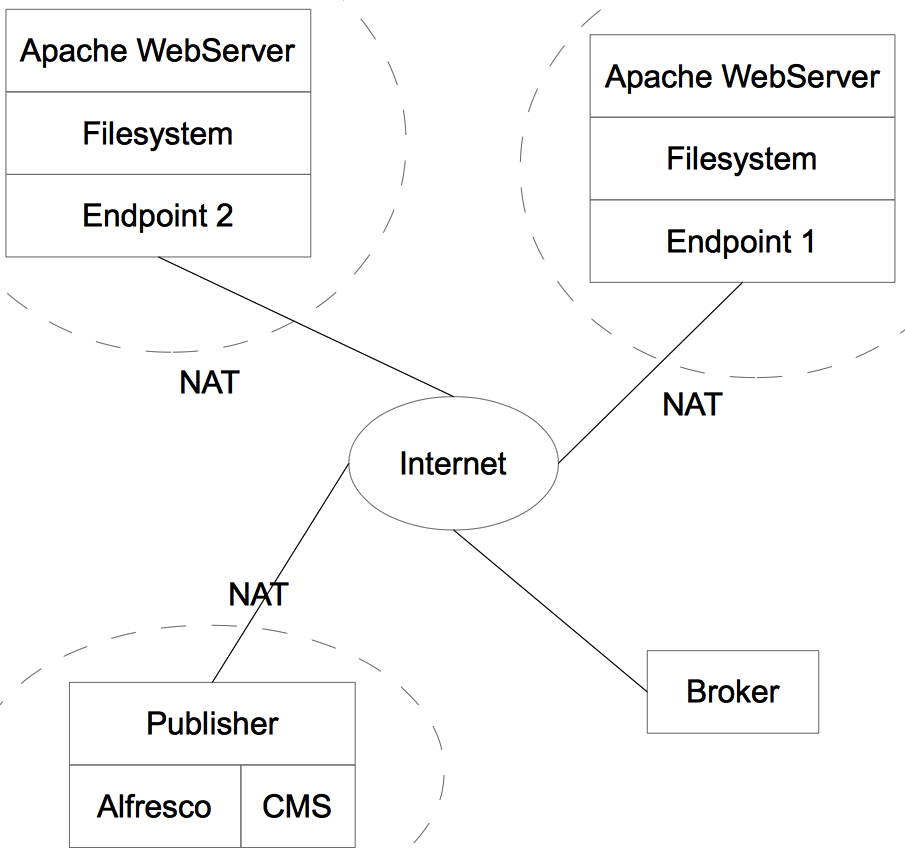
My solution is based on Broker, which provides communication between publisher and endpoints, which both may be behind NAT. Each endpoint is subscribed to queue on broker and when request for publish comes, it locally compares published version and if published is newer, it sends request for content and content is transfered. Depublishing works the same way, data consistency is secured by ‚sync‘ mechanism – endpoint may send local file list to publisher, which checks its integrity and do appropriate actions.
Publisher/endpoint scheme
First version was based on RabbitMQ and HSQLDB and had a lot of performance and security issues, but as I said – I’d like to resurrect it now, rewrite and open source it. I just need to be sure that there is no such a project, because I don’t want to do the same thing. If anyone knows similar stuff, please let me know!
First post of this series ended with code snippet, which invokates importAction itself. It’s not still the importing itself, but we are almost there. This post will be about what happenes, what hapened before and what is going to happen :-). But first things first, let’s have a look on Factory and Proxy pattern, which … Pokračovat ve čtení „Import scripts architecture, pt. II“
First post of this series ended with code snippet, which invokates importAction itself. It’s not still the importing itself, but we are almost there. This post will be about what happenes, what hapened before and what is going to happen :-). But first things first, let’s have a look on Factory and Proxy pattern, which are used while calling imports.
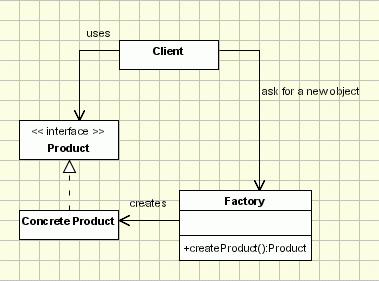
Factory pattern is based on idea instead of creating a new object with new operator, factory is asked, which returns a new instance. This is way standard Spring’s bean factory works. It may looks like following diagram (image is from oodesign.com):
Factory Pattern (click for source - oodesign.com)
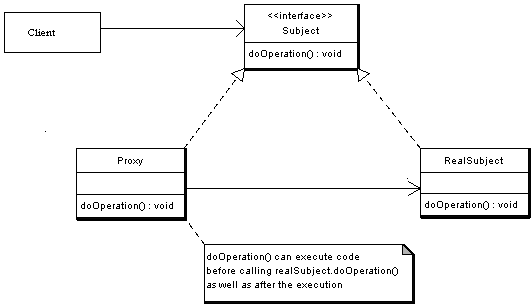
To hide newly created instance behind an interface facade Proxy pattern is used. This functionality is imho basic of AOP programming, because instead of calling original object, something else may be called. Have a look on following diagram (again from oodesign.com):
Proxy Pattern (click for source - oodesign.com)
Now it’s possible to put those patterns together and get real importAction functionality: importAction is just an interface, which hides importActionImpl newly created for every request. This can be seen on following snippet of application context configuration.
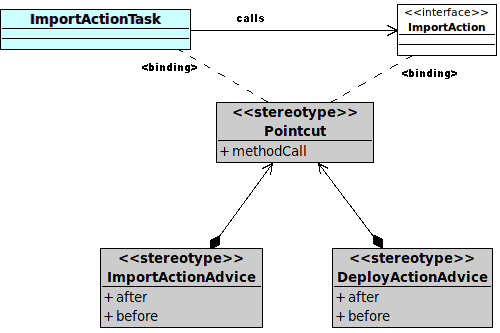
As I wrote a while before – all of this is done due to posibility of calling something else. But back to implementation, for details refer to some AOP documentation. Method importAction.invocateImportScript() is a pointcut, on which two advisors are bound. Have a look at following diagram.
ImportActionAdvice
This configuration can be achieved by NameMatchMethodPointcutAdvisor, see following snippet for ImportContentAdvisor bean definition and updated ImportAction itself:
Last few lines is definition of importActionTask I wrote in previous post. In this class importAction.invocateImportScript() method is called. This method has one parameter – map of properties of config file (in format <QName, Serializable>) to read them once and have them all the time and not need to call nodeService.getProperties() again and again – in advisors or importAction class. When this method is called, proxy of importAction catches this calling and calls invoke() method on ImportContentAdvice and DeployContentAdvice. Let’s have a look on invoke() method in ImportContentAdvice:
All what ImportActionAdvice does can be seen on previous snippet. It locks used config file to prevent access from another thread, using node uuid as a locking token. Then it authenticates a system user (mainImportThread runs outside any security context) and invocates next chain (DeployContentAdvisor and after then invocateImportScript(), if everything goes ok). After return from invocation lock is released and security context is cleared. If anything happens inside, lock release is skipped, so some rescue mechanisms are automaticaly initiated after some time. Simple, yet effective, i hope.
It has been some time since last post about import scripts from external sources to alfresco repository, I was busy with debugging and threading, but now I have some little time to write some notes on that topic again. I’d like to introduce „architecture“ of my solution, at least a first part of it, so … Pokračovat ve čtení „Import scripts architecture“
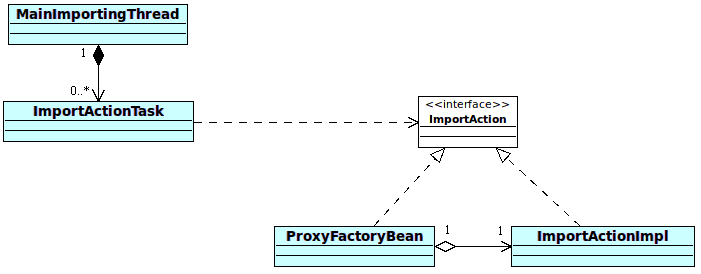
It has been some time since last post about import scripts from external sources to alfresco repository, I was busy with debugging and threading, but now I have some little time to write some notes on that topic again. I’d like to introduce „architecture“ of my solution, at least a first part of it, so lets start with an image.
Calling ImportAction
MainImportingThread is Runnable implementation, which is initiated on init. Main thread sleeps some time and searches for config files in repository, while not sleep. If found some, ImportActionTask instance is created for each config in separate thread. ImportActionTask checks, if is it possible to run script described by config. If so, run script method on ImportAction is executed. That’s in few words functionality of the first part. Now in more details.
First version used quartz jobs triggered by org.alfresco.util.CronTriggerBean every 10 seconds, but that was temporarily solution, too heavy in my eyes. In second version I tried to use BatchProcessor, but spent few days without got it worked as I want :-(. Finally I used ThreadPoolTaskExecutor with combination of java.lang.Runnable in main thread and it worked like a charm! As I wrote a while ago, MainImportingThread has its own separate thread, which cyclically looks for configuration files in repository. It looks like following snippet:
[code lang=“java“]
public void init() {
taskExecutor.execute(new Runnable() {
@Override
public void run() {
while(keepAlive) {
Thread.sleep(threadSleepMs);
For every row in result set PoolableObjectFactory creates a new instance of ImportActionTask and pass it to ThreadPoolTaskExecutor to execute. After all that – object is destroyed (destroyObject method is there just for sure – in time this method is called action still runs).
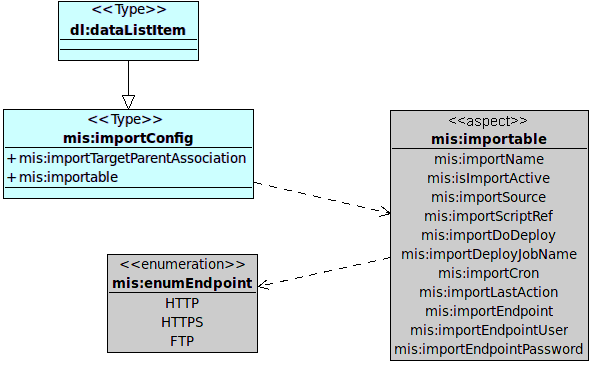
ImportActionTask is Runnable implementation, so every action runs its own thread. After execution isTimeToRun() method is called and action runs only when it’s its time and action is enabled, as it defined in data model illustrated on following diagram.
Config model
isTimeToRun() method uses fields importCron, importLastAction and isImportActive for its work. Its body looks similar to following simplified code snippet:
String cronString = model.getImportCron();
Date lastAction = model.getLastAction();
CronExpression cronExpression = new CronExpression(cronString);
if(cronExpression.getNextValidTimeAfter(lastAction).getTime() > System.currentTimeMillis())
return false;
return true;
}
[/code]
Previous snippet checks cron expression against time of last successfully executed action using org.quartz.CronExpression and in case of success (ie lastAction+cron < current time) importAction itself may be triggered. But more on this next time, right now just another snippet from ImportActionTask, which calls importAction (received from ProxyFactoryBean):
While creating import services I want some configuration mechanism for (not just) BatchProcessor. I like Alfresco’s *-config-custom.xml files (aka Spring framework XMLConfigService), so I did simple custom config service. Anyone, who customized Alfresco, knows format of this file (web-client-config-custom.xml). I put that structure to new file – mis-config-custom.xml: [code lang=“xml“] <alfresco-config> <config evaluator="string-compare" condition="imports"> <processor> … Pokračovat ve čtení „Custom configs in Alfresco“
While creating import services I want some configuration mechanism for (not just) BatchProcessor. I like Alfresco’s *-config-custom.xml files (aka Spring framework XMLConfigService), so I did simple custom config service.
Anyone, who customized Alfresco, knows format of this file (web-client-config-custom.xml). I put that structure to new file – mis-config-custom.xml:
Please note those constants are just for ilustration purposes now, more on them in scripting series. My MisConfigService extends org.springframework.extensions.config.xml.XMLConfigService, but uses nothing from that class (except init method in bootstrap), I just added some statics inside to keep things together:
[code lang=“java“]
public class MisConfigService extends XMLConfigService {
public MisConfigService(ConfigSource configSource) {
super(configSource);
}
public static String getChildValue(Config config, String elementId, String childName, String defaultValue) {
ConfigElement myConfig = config.getConfigElement(elementId);
String result = myConfig.getChildValue(childName);
return (result==null ? defaultValue : result);
}
public static Integer getChildValue(Config config, String elementId, String childName, Integer defaultValue) {
Integer result = defaultValue;
try {
String number = getChildValue(config, elementId, childName, defaultValue.toString());
result = Integer.parseInt(number);
} finally { /* O:-) */ }
return result;
}
. . .
}
[/code]
To instantiate this service just add bean definition with UrlConfigSource(-s), which defines path to custom xml configuration:
That’s all! And now for something completely different! I also spent some time trying to get properties files working and putting those properties into Spring configurations. There’s nice solved thread in Alfresco forums. Prefix helps:
<!– and I can use stuff from properties file with prefix –>
<bean class="foo.bar.Example">
<property name="fooAttribute">
<value>${mis:some.sample.property}</value>
</property>
</bean>
[/code]
In my last blogpost on this topic I wrote about invoking rhino scripts programatically from Alfresco and about passing its model into freemarker templates. After that I realized that alfresco templateService is unable to render more complex models (nested classes and collections) if called this way (please note on Alfresco webscripts invoked standard way this … Pokračovat ve čtení „More on invoking scripts in Alfresco“
In my last blogpost on this topic I wrote about invoking rhino scripts programatically from Alfresco and about passing its model into freemarker templates. After that I realized that alfresco templateService is unable to render more complex models (nested classes and collections) if called this way (please note on Alfresco webscripts invoked standard way this works correctly!). I think the problem is – no wrapper is used while passing model. I spent lot of time trying many things, read a lot of posts and topics on that, played with built-ins, trying to find that part in Alfresco source, but still no result, just exceptions. But solution is VERY SIMPLE – to write own templateService :-). Well, maybe this post is more about Freemarker and Rhino than Alfresco, sorry about that!
So, what I want to achieve? Suppose some simple script like this one:
Now after calling templateService.processTemplate( . . . ) the output is Exception this and Exception that… That happens, because Rhino creates NativeObjects for those objects and after passing those objects to Freemarker (through Java – without any ObjectWrapper), which doesn’t know how to handle them. The same situation happens when passing a collection with generics like <String, Object> into model – those Objects are standard Java objects and in Freemarker acts like them, they really don’t have attributes like q, a, b, etc. :-). Similar situation can happen with collections – they needs to be wrapped too. But stop with theory, back to practise. For those interested in wrapping and so, follow Freemarker documentation on wrappers.
Before wrapping – when I printed out keys of model, there were’nt my attributes defined in Javascript. What I found inside is on following listing, note my attributes are also there – bar, foo, arr, obj:
Those properties belongs to hashMap and is possible to get rid of them using simpleMapWrapper, this technique is described well in Rizwan Ahmed post.
What about my templateService implementation? First I tried to use JSONtoFmModel and convert javascript objects to strings, but that was no way forward. That was before I discovered wrappers :-). There is RhinoWrapper class in Freemarker and it solves all my problems! It can be used as simple as this:
[code lang=“java“]
Configuration cfg = new Configuration();
RhinoWrapper rhinoWrapper = new RhinoWrapper();
Previous listing creates new Freemarker configuration instance and rhino wrapper instance and binds them together. With that configuration it’s possible to create template instance, which takes reader with template content, let’s read it from repository:
[code lang=“java“]
NodeRef nodeRef = new NodeRef("workspace://SpacesStore/56ba2237-f776-494a-939b-d259b68c021a");
Template template = new Template("my_template", new InputStreamReader(inputStream), cfg);
[/code]
That’s all we need to render. Rendering takes one more parameter – model map, which is HashMap defined in my previous blogpost. To keep it simple (and post a little shorter) I’m writing output to sysout:
[code lang=“java“]
OutputStreamWriter streamWriter = new OutputStreamWriter(java.lang.System.out);
template.process(rootMap, streamWriter);
[/code]
Those few lines and everything works fine now! But I got some silver hairs with trying to solve that, now I can feel like a boss, so I achieved new „Alfresco guru badge“ :-). Also I’m thinking about some public GIT repository with my Alfresco inventions, what you think about it?
Like an Alfresco guru!
PostScriptum: Can anyone explain me why Alfresco uses Rhino version 1.6R7 which is from year 2007? :-O
I’m working on universal CRON runner, which runs scripts saved somewhere in repository (more on this next time). Running webscripts isn’t so easy, as I thought, there is no scriptService.runScriptWithThisDescription(path) method, so I did some research and got some results, which I’d like to share. It’s possible to run java backed actions from js-webscripts. Everything you … Pokračovat ve čtení „Invoking scripts in Alfresco programatically“
I’m working on universal CRON runner, which runs scripts saved somewhere in repository (more on this next time). Running webscripts isn’t so easy, as I thought, there is no scriptService.runScriptWithThisDescription(path) method, so I did some research and got some results, which I’d like to share.
It’s possible to run java backed actions from js-webscripts. Everything you need is just a bean extending ActionExecuterAbstractBase with definition parent=“action-executer“ and it’s possible to access that bean from webscript like actions.create(„that_bean_id“). But not in reverse, at least not so simple.
First think I found was post on forum and advice to look at unit tests of webscripts, but everything I found were invocations through http. So I went deeper and figured out that Alfresco uses Rhino JavaScript implementation for scripts. At Rhino pages are good examples, so I had first working script soon. At following codelist I firstly load content of node (script body) from repository and then invocate script itself.
[code lang=“java“]
NodeRef nodeRef = new NodeRef("workspace://SpacesStore/4a96aaaa-bb80-eeee-aaaa-800a43fcddb8");
ContentReader contentReader = contentService.getReader(nodeRef, ContentModel.PROP_CONTENT);
InputStreamReader isr = new InputStreamReader(contentReader.getContentInputStream());
BufferedReader reader = new BufferedReader(isr);
But I wanted something more – some model in and out and something simplier. So I found ScriptService. Now all those long lines can be ommited, because there is executeScript method!
[code lang=“java“]
Map<String, Object> model = new HashMap<String, Object>();
model.put("foo", "bar");
Object result = scriptService.executeScript(scriptRef, model);
[/code]
Template rendering (I’m using FreeMarker’s ftls) is done the same way, but through TemplateService and processTemplate(nodeRef, model) method, which accepts the same model (altered by script running).
The most beautiful thing is ability of script (and also template) to call java methods, which classes are „injected“ through model, let’s see an example.
[code lang=“java“]
Map<String, Object> model = new HashMap<String, Object>();
model.put("something", new Something());
model.put("bar", "foo");
Object result = scriptService.executeScript(scriptRef, model);
String templateResult = templateService.processTemplate("workspace://SpacesStore/noderef", model);
. . .
public class Something {
public String text = "aaa";
public String getText() {
return "bbb";
}
}
[/code]
Now it’s possible to use script / template:
[code lang=“javascript“]
(** script **)
bar = something.text;
What is output? Is in templateResult „aaa ?=? aaa“? Nope! Script accesses class attributes directly, on the other side template accesses methods. So output is „bbb ?=? aaa“!!!
One more important thing: this JavaScript implementation is just a stub, so every alfresco service needs to be „injected“ through model, so for example it’s impossible to run stuff like this without modifications:
[code lang=“javascript“]
var connector = remote.connect("http");
var result = connector.call("http://www.google.com/");
[/code]
Remote object has to be injected (this script is from Share/Surf), more on this in this blogpost. You have to add ScriptRemote to model and create spring-webscripts-config-custom.xml with endpoints defined, see that post. Also another services needs to be injected – to get access to repository, search service… good starting point is Alfresco Wiki.
Edit: Native Java API Access described in wiki is wrong, IT IS POSSIBLE to access maps in JavaScript like this:
[code lang=“javascript“]
var value = javaMap.key;
[/code]
I tried to find out how to delete completed workflows in Alfresco, but I find no way to do that. I’m talking about HUGE number of completed workflows – a thousands. There are many questions on that topic, but no solution. I tried to play with Workflow console, also tried Alfresco Workflow Purge webscript by … Pokračovat ve čtení „Deleting workflows in Alfresco“
I tried to find out how to delete completed workflows in Alfresco, but I find no way to do that. I’m talking about HUGE number of completed workflows – a thousands. There are many questions on that topic, but no solution. I tried to play with Workflow console, also tried Alfresco Workflow Purge webscript by Rothbury software and also tried to write own deleters based on Workflow service (more on this next time), but no success at all. In better cases process dies with „out of memory“, or completely locks Alfresco in worst cases. So I choose hardcore solution – to delete database tables. And it works :-).
I’m talking about 10 tables, which are bind with foreign keys. So to remove ALL workflows follow those steps (note I’m not responsible for data loses, you’re on your own, so backup carefully!):
Stop Alfresco and stop mysql
Do backups – at least alf_data and /var/lib/mysql
Start mysql and open mysql client
Turn off foreign key checking: SET FOREIGN_KEY_CHECKS=0;
Truncate following tables:
JBPM_TOKEN
JBPM_TOKENVARIABLEMAP
JBPM_TASKINSTANCE
JBPM_SWIMLANEINSTANCE
JBPM_PROCESSINSTANCE
JBPM_MODULEINSTANCE
JBPM_LOG
JBPM_BYTEBLOCK
JBPM_BYTEARRAY
JBPM_VARIABLEINSTANCE
Maybe it’s good idea to set index.recovery.mode to FULL
Simple yet effective. Please, let me know, if it works on your Alfresco too. I tested it od Community versions 3.4.e, 3.4.d and 4.1.0 (built from svn).
Nowadays I’ve been working on policies and triggering a behavior based on user action, so I wanted to write about it, but I found more interesting stuff I did with it than triggering itself (which is by the way well described by Jeff Potts). I wanted a routine, which runs on every node created and … Pokračovat ve čtení „Creating rules programaticaly“
Nowadays I’ve been working on policies and triggering a behavior based on user action, so I wanted to write about it, but I found more interesting stuff I did with it than triggering itself (which is by the way well described by Jeff Potts). I wanted a routine, which runs on every node created and adds a rule, if that node is a folder.
At first I did some research on rules. How are rules bound to nodes? We’re working on repository, so it should be a node. When you open a node browser and look on node with rule bound, you’ll see ‚ruleFolder‘ child of that node of ruleFolder type. Children of this node are rules itself – one child, one rule. Inside each are actions defined with conditions and actions with their parameters, like on following structure:
RuleFolder structure
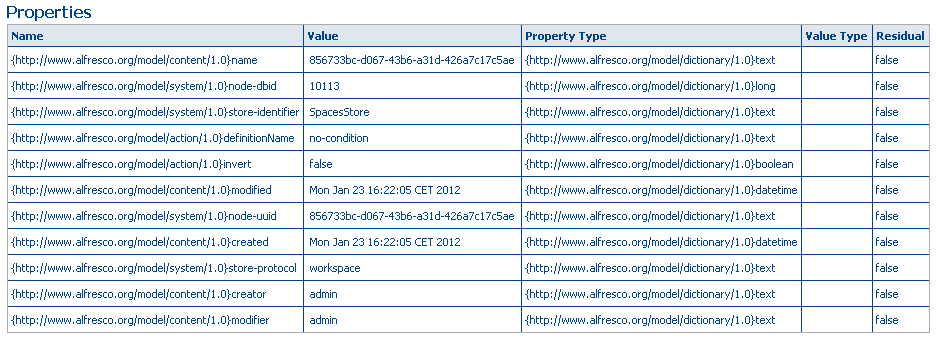
Conditions may be structured too – if condition is not „no-condition“ – there may be much complicated structure: either condition itself (actioncondition node type) with parameters as children, or composite-condition (compositeactioncondition node type) with conditions nested inside. Each condition has „invert“ boolean variable, which inverts condition meaning. Properties of simpliest condition (no-condition) are on following image:
Condition properties
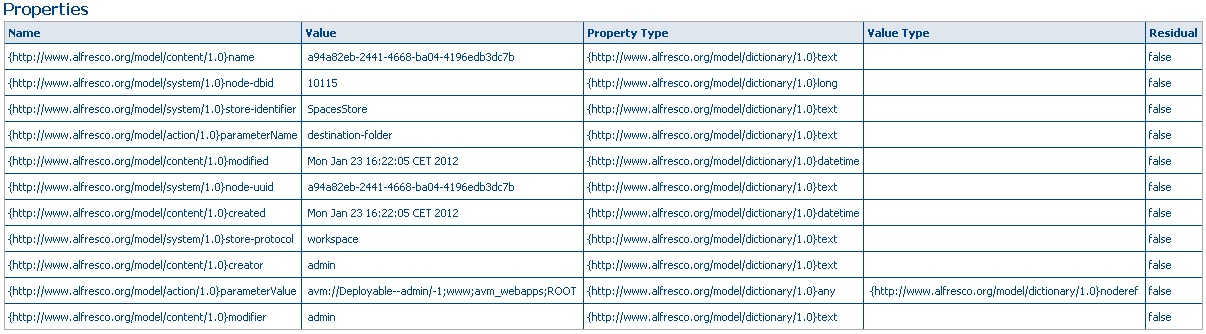
Parameters are another types of node – actionparameter. Each has two important properties: parameterName and parameterValue and those values depends on action (or condition) on which is this parameter bind to. Example of parameter for copy-to-webproject action is on following image:
Parameter properties
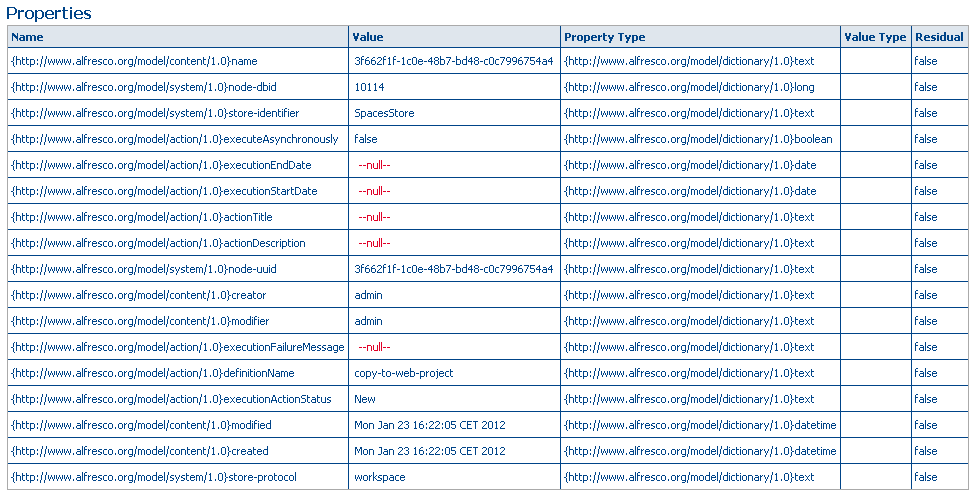
And of course third node type – action. With or without parameters. In both cases with properties like definitionName, executeAsynchronously, etc. see following image:
Action properties
Examples on how to set rule on node are in nodeRef cookbook. I worked with CopyToWebProject action, which can be with parameters defined like this:
Note static variables with parameter names (prefix PARAM_). Executers are in org.alfresco.repo.action.executer package, or it’s possible to use own action executer (extending ActionExecuterAbstractBase).
Next step is to add a condition, in my case HasAspectEvaluator like this:
Evaluators (package org.alfresco.repo.action.evaluator) also have parameter names defined with prefix PARAM_. Previous code creates condition testing aspect is NOT set on node (note setInvertCondition() method) – this condition is for testing copied content is not working copy.
Created condition and action should be placed in CompositeAction:
This is enough and it should work. What am I using it for? I need CopyToWebProject rule to foolow tree structure in DM, not just copy everything in subdirs to given folder. So I have my own implementation of OnCreateNodePolicy, which binds this rule to every created folder (under some conditions of course).
Last week I had to change browse.jsp view in alfresco and I need to add custom columns – attributes from my own data model. It’s pretty simple and I’ll explain that in this blogpost. I tried to do is as much simple as possible, so I removed all other view types but details and in … Pokračovat ve čtení „Adding columns to custom browse.jsp“
Last week I had to change browse.jsp view in alfresco and I need to add custom columns – attributes from my own data model. It’s pretty simple and I’ll explain that in this blogpost.
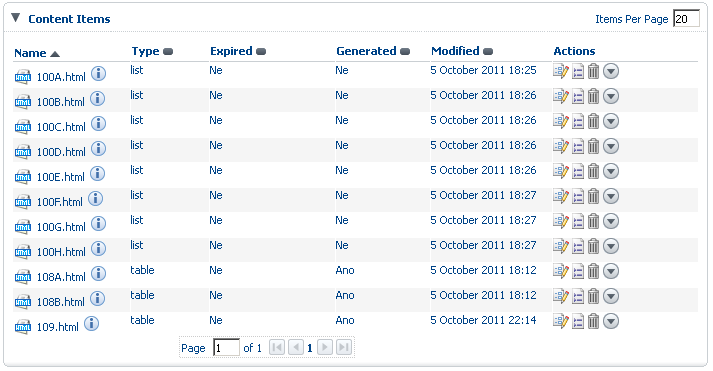
I tried to do is as much simple as possible, so I removed all other view types but details and in this view I added some boolean properties, which have own action handler – so are clickable and after click change their state. Result of this changes is on following screenshot.
How does it look like
You can see I added two boolean properties (in Czech – Ano = true, Ne = false) among others (Type). To do that I needed to override BrowseBean and create own NodePropertyResolver. Now from the begining:
I created custom document model,
wrote custom browse.jsp (just copied and edited original one),
overrode outcomes to new view,
overwrote BrowseBean and wrote custom NodePropertyResolver.
Creating custom document model is well described everywhere else (at least in alfresco wiki), so I’m not going to describe it here, also overriding views. Lets start with altering browse.jsp.
Items in list are created by RichList component, in which we are interested in just some attributes: viewMode and value. ViewMode is a String value (details, icons, list) with default view mode. When I tried to change ViewMode value to details, it doesn’t work correctly, so I had to override getBrowseViewMode() to return „details“.
[code language=“java“]
public class BrowseTeletextBean extends BrowseBean {
. . .
private NodePropertyResolver pageExpiredResolver = new BooleanNodePropertyResolver(TxtModel.txtExpired, getNodeService());
. . .
@Override
public String getBrowseViewMode(){
return „details“;
}
@Override
public List<Node> getContent() {
List<Node> list = super.getContent();
Value should return list of Node type, in which I wanted to add custom fields, so I needed to override it too. I put there some propertyResolvers – I did my own BooleanPropertyResolver:
[code language=“java“]
public class BooleanNodePropertyResolver implements NodePropertyResolver {
private NodeService nodeService;
private QName qName;
Here you can see actionLink with value defined by custom NodePropertyResolver (r.pageExpired), which renders either „Ano“ or „Ne“ based on value in TxtModel.txtExpired (QName) property in model.
[code language=“java“]public static final QName txtExpired = QName.createQName(„http://www.alfresco.org/model/txt/1.0“, „expired“);[/code]
ActionLink has an action handler – actionListener parameter – this handler just change value of the expired property and is as simple as this:
Note that UIContext…notifyBeans() is needed to notify beans, that some change had been done and we need to refresh view. For this refresh also refreshOnBind parameter on richList is needed to be true.
It was easy to put it together, but like everything in Alfresco – badly documented. So I hope this post help someone. Feel free to ask questions, if something is not clear enough ;-).
One of things I missed in Spring Surf are Models and Controllers. I tried many ways to get them working, but still no useful solution. So I chose really simple way to do that – to define another dispatcher and to play with urlrewrite. In this post I’ll describe what I did and as a … Pokračovat ve čtení „MVC and Spring surf“
One of things I missed in Spring Surf are Models and Controllers. I tried many ways to get them working, but still no useful solution. So I chose really simple way to do that – to define another dispatcher and to play with urlrewrite. In this post I’ll describe what I did and as a little bonus you’ll find a breathtaking example 🙂 – YUI based Ajax whisperer.
Now add dispatcher – in web.xml we have to define new servlet with name controller, loaded as second and with url-pattern /app (default dispatcher is mapped to /service), which is filtered by urlrewrite.
In next step we’ll need web application config – Spring names them as -servlet.xml prefixed with servlet name. So let’s create controller-servlet.xml in WEB-INF (in STS New/Spring bean configuration file) and add some useful stuff there: for first we want to use annotations for our controllers, so let’s add there two beans – DefaultAnnotationHandlerMapping and AnnotationMethodHandlerAdapter.
Okay, folks, that’s almost all! Now the interesting part: Writing the controller. Make a class in package we defined earlier. It should extend some AbstractController or another stuff, but it’s not necessary, we’ll simple it! 😉 Put a test method inside:
package cz.shmoula.controllers.controller;

@Controller
public class AutocompleteController{

  @RequestMapping(value = "/test")
  public String test(Model model){
    model.addAttribute("attribute", "Some sample string");
    return "test";
  }
}
That’s our controller. Now we need a view. Previously we defined parameters for view resolver and in controller we’re returning name of our model. Putted together result is: /WEB-INF/jsp/test.jsp
<!DOCTYPE html PUBLIC "-//W3C//DTD XHTML 1.0 Strict//EN" "http://www.w3.org/TR/xhtml1/DTD/xhtml1-strict.dtd">
<html xmlns="http://www.w3.org/1999/xhtml">
  <head>
    <meta http-equiv="Content-Type" content="text/html; charset=utf-8" />
    <title>Test page backed by controller</title>
  </head>
  <body>
    <h1>Hi, what we have there?</h1>
    <p>${attribute}</p>
  </body>
</html>
Last thing to do is to define some rules for urlrewrite. We’ll try to forward all /app/ requests to our dispatcher and anything else to Default Spring Dispatcher. That’s done by these rules (urlrewrite.xml):
That was the first part – worst one, now came pure fun – some functionality. We want to implement some buzzlike thingy as Autocompletion is – whisperer. To keep it simple our model layer will be just a Collection with Strings, so let’s modify our controller with constructor:
private Collection<String> termList = new HashSet<String>();
public AutocompleteController() {
    termList.add("Prague");
    termList.add("Paris");
    termList.add("Poznan");
}
Now we need controller code – something returning some results. So at /autocomplete will be routine, which waits for „query“parameter with part of String, which tries to find in termList and return:
@RequestMapping(value = "/autocomplete")
public void autocomplete(HttpServletRequest httpRequest, Model model) {
    String query = httpRequest.getParameter("query");
    String response = "";

    if (query != null) {
        for (Iterator<String> i = termList.iterator(); i.hasNext();) {
            String term = i.next();
            if (term.startsWith(query))
                response += "n" + term;
        }
    }
    model.addAttribute("response", response);

}
Now we have to render our model through something, so add view /WEB-INF/jsp/autocomplete.jsp:
${response }
And now to add all that into widget. Let’s extend calendar widget in /WEB-INF/webscripts/calendar – first add styles and YUI scripts into calendar.get.head.ftl:
Ok, that’s all for this post, looks like it works! So you can download backup of this code somewhere around here and enjoy it on your own devbox. Keep looking forward for next stuff, maybe using facebook login with Spring social, who knows ;-).