I’ve been struggling with exporting my private key from bitcoin-qt a little bit, so now when I successfully done it, I’m going to describe those steps here. I had old wallet.dat and switched to Electrum wallet, but after MININGCO.ETF closure I received some funds into my old wallet, so there was need to get them out. … Pokračovat ve čtení „HOWTO export private key from bitcoin-qt“
I’ve been struggling with exporting my private key from bitcoin-qt a little bit, so now when I successfully done it, I’m going to describe those steps here. I had old wallet.dat and switched to Electrum wallet, but after MININGCO.ETF closure I received some funds into my old wallet, so there was need to get them out. First I was trying to use PyWallet, but without any success. So I did it with CLI access to bitcoin-qt wallet. Here we go:
Quick note: please use Google plus community for asking a questions. I like to read reviews of my applications on Google Play, especially those with suggestions and questions :). Last few days I’m getting more and more questions like this one for Fake Camera Won’t open on kik When I tried to send a pic … Pokračovat ve čtení „Howto clear defaults to get Fake Camera running again“
I like to read reviews of my applications on Google Play, especially those with suggestions and questions :). Last few days I’m getting more and more questions like this one for Fake Camera
Won’t open on kik When I tried to send a pic as a live pic from the gallery it took me to the regular camera and didn’t give me the option to choose the app or the regular camera.
or this one
Fake Camera does not work for me, you sucks!
So because of that I’m going to write a step by step how to clear defaults and let camera picker appear again, because that is the main reason of those problems. We’ll start quickly, I just want to say following at the beginning: If this work for you, don’t forget to change your rating and review on Google Play!!!!
If you accidentally selected „Use as default“ checkbox in Camera picker, it’s possible to revert this, Just follow these steps:
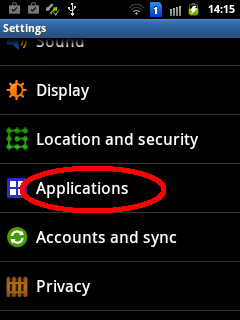
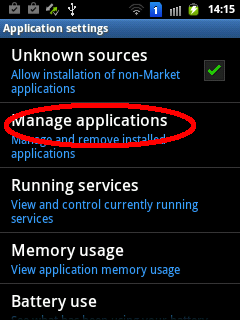
Open phone settingsChoose „Applications“Then „Manage applications“
And now comes the tricky part: in application list select that app, which opens automatically instead of camera picker, in my case it’s standard Camera app:
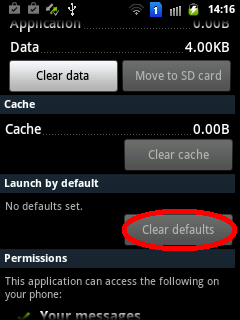
In All apps select Camera applicationTap „Clear defaults“ button and confirm
And we are done for now, camera picker dialog should appear instead of default selected application. Please note that this has nothing to do with inapp camera some applications may use – that’s impossible to fake.
One more time – if your Fake Camera works again, don’t forget to change your rating and review on Google Play, thank you! And, of course, if you’d like to say thanks for Fake Camera, just buy a Donate Version, or send me some bitcoins or so. Thank you!
I’m working on search activity for Beermapa and because I did not find any topic covering reading access to SearchRecentSuggestions and I needed to load saved suggestions and fill a ListView with them, so I did some research and wrote this post. What I want to achieve is an input for writing search query, which … Pokračovat ve čtení „Howto access recent query suggestions on Android and populate ListView with them“
I’m working on search activity for Beermapa and because I did not find any topic covering reading access to SearchRecentSuggestions and I needed to load saved suggestions and fill a ListView with them, so I did some research and wrote this post.
What I want to achieve is an input for writing search query, which displays custom suggestions (based on searching query) and also ListView placed right under input box, which displays recent search queries.
SearchView with ListView
My first try was with EditText and TextWatcher, which after each written character filtered my listAdapter backing ListView, something like this:
[code lang=“java“]
searchEditText.addTextChangedListener(new TextWatcher() {
public void afterTextChanged(Editable s) {}
public void beforeTextChanged(CharSequence s, int start, int count, int after) {}
public void onTextChanged(CharSequence s, int start, int before, int count) {
adapter.getFilter().filter(s);
}
});
[/code]
But since Android has pretty good Search Interface, I was wondering how to use it with my search (because of possible future use of voice search etc.). Adding recent query suggestion is described in tutorial, also custom suggestion is. But there is nothing about how to access saved queries another way then in SearchView whispering box. Saving is really easy:
[code lang=“java“]
SearchRecentSuggestions suggestions = new SearchRecentSuggestions(getApplicationContext(), MySuggestionProvider.AUTHORITY, MySuggestionProvider.MODE);
suggestions.saveRecentQuery(query, null);
[/code]
First solution which came on my mind was to implement own saveRecentQuery routine, which saves last queries to local database, but that’s not the way – why to write already written code again?
Finally – there is possibility to access those saved queries through ContentResolver, which returns Cursor:
Note that last parameter in SimpleCursorAdapter – it’s there because of deprecation of constructor with FLAG_AUTO_REQUERY, for more details see this Stack Overflow topic.
Dlouho jsem nic nenapsal a protože jsem si právě vygeneroval novou krásnou (1SHM12iG4KPRs54CxjLsCwbvnMJp4bMh5) Bitcoinovou adresu (jo, mohlo to být lepší, ale není na to výkon) na Mackovi za pomocí Vanitygenu, poznamenám si tu postup. Zdrojáky Vanitygenu je možné stáhnout z GitHubu, kde by měl být i Makefile pro Macka. Problém je v tom, že Macek … Pokračovat ve čtení „Vanitygen a import adresy do Bitcoin-QT na MacOS“
Dlouho jsem nic nenapsal a protože jsem si právě vygeneroval novou krásnou (1SHM12iG4KPRs54CxjLsCwbvnMJp4bMh5) Bitcoinovou adresu (jo, mohlo to být lepší, ale není na to výkon) na Mackovi za pomocí Vanitygenu, poznamenám si tu postup.
Zdrojáky Vanitygenu je možné stáhnout z GitHubu, kde by měl být i Makefile pro Macka. Problém je v tom, že Macek má staré verze OpenSSL knihoven (na mém 10.7.5 je OpenSSL 0.9.8x 10 May 2012), takže je nutné použít ty z Homebrew. No a protože není dobrý nápad natvrdo zadávat cestu ke knihovnám a po změně kompilovat znovu, proč si pohodlně netapnout repozitář s Vanitigenem rovnou? Takže i s instalací OpenSSL a Vanitigenu následovně:
Teď už je možné si nechat vygenerovat adresu a privátní klíč:
[code]bash-3.2$vanitygen 1SHM1[/code]
Závěrečným krokem je import privátního klíče do peněženky – používám Bitcoin-QT 0.8.2. Takový nástřel je na bitcoin wiki, kterou doporučuju před akcí projít. Akce samotná sestává z následujících kroků:
spuštění Bitcoin-QT v režimu serveru (kdy naslouchá RPC na portu 8332),
odemknutí peněženky na dobu nezbytně nutnou k provedení importu,
provedení importu soukromého klíče,
…,
profit.
Aby bylo možné spustit Bitcoin-QT v režimu serveru, je nutné nastavit heslo pro uživatele rpcuser. Provede se to přidáním dvou řádků do konfiguračního souboru ~/Library/Application Support/Bitcoin/bitcoin.conf.
[code]rpcuser=bitcoinrpc
rpcpassword=***************[/code]
Bitcoin-QT je nutné spustit v režimu serveru – provede se tak v konzoli pomocí příkazu
[code]bash-3.2$ open Bitcoin-Qt.app –args -server[/code]
Jakmile naběhne, je možné posílat příkazy na port 8332 – např. pomocí curl. Protože se však takto budou zapisovat hesla a privátní klíče přímo do konzole, je vhodné zapisované příkazy potlačit v historii – před příkaz se do konzole přidá mezera. Sled příkazů je následující:
[code]bash-3.2$ curl –user bitcoinrpc –data-binary ‚{"method": "walletpassphrase", "params": ["heslo_do_penezenky", 120] }‘ http://127.0.0.1:8332/
Enter host password for user ‚bitcoinrpc‘:
{"result":null,"error":null,"id":null}
bash-3.2$ curl –user bitcoinrpc –data-binary ‚{"method": "importprivkey", "params": ["5_privatni_klic_pr_nove_vytvorenou_adresu_pomoci_vanitigenu", "popisek adresy"] }‘ http://127.0.0.1:8332/
Enter host password for user ‚bitcoinrpc‘:
{"result":null,"error":null,"id":null}
[/code]
První příkaz odemkne peněženku na 120s, což by mělo pro provedení druhého příkazu postačovat – stačí jen jeho iniciace, rescan blockchainu může probíhat až po opětovném (automatickém) locknutí.
V tento okamžik (až doběhne import) se nová adresa objeví v adresáři, ne mezi adresami pro příjem. Tomu napomůže ukončení Bitcoin-QT a opětovné spuštění, tentokrát už jako „obyčejné“ aplikace.
Už je to rok a půl, co jsem majitelem v nadpise uvedené hračky. Mimo úvodních pár měsíců, kdy jsem byl nadšen rychlostí systému (v porovnání s G1), jsem na telefon permanentně nadával a v poslední době to gradovalo do takových extrémů (touha rozmlátit telefon, komunitu i google), že jsem se konečně přinutil věnovat odpoledne nahrání … Pokračovat ve čtení „Custom ROM a Samsung Galaxy S2“
Už je to rok a půl, co jsem majitelem v nadpise uvedené hračky. Mimo úvodních pár měsíců, kdy jsem byl nadšen rychlostí systému (v porovnání s G1), jsem na telefon permanentně nadával a v poslední době to gradovalo do takových extrémů (touha rozmlátit telefon, komunitu i google), že jsem se konečně přinutil věnovat odpoledne nahrání Custom ROMky, zprovoznění ROOTa a image s recovery. A protože jsem ne všechny potřebné informace a nástroje našel na jednom místě a navíc se potýkal s drobnými problémy, přijde mi vhod udělat tímto postem takový malý rozcestník.
Když jsem svého času přehrával systém v G1 (CyanogenMod a později SuperD), byly všechny kroky popsány pěkně pod sebou přímo na stránkách s danou ROMkou, u Toshiby se daly rozumně dohledat po fórech. Co se však týká SG2, našel jsem víceméně kulové. Všechny návody (oficiální) počítají s tím, že už požívám nějakou jinou ROMku a přestože někdy úvod a nadpis vypadá, že bude dále řeč o vanilla Samsung paskvilu androidu, nebylo tomu tak. Mimo jiné se tyto návody specializují spíše na Windows, já však potřeboval update provést z Macka (a obecně by to mělo fungovat i pro GNU Linux).
Miui
Pokusím se tyto kroky sepsat níže, spolu se zdrojem, odkud jsem čerpal. Uváděná čísla verzí (pokud je uvedu) se samozřejmě časem změní, takže v mnoha případech zůstanu pouze u uvedení názvu daného nástroje a strýček google jistě poradí. Ještě bych na úvod poznamenal, že nenesu žádné riziko, pokud si někdo následujícím postupem s telefonem něco provede.
1. Instalace obrazu zavaděče – postupoval jsem podle howto ve wiki Cyanogen modu, který mě nasměroval na Heimdal Suite, což je multiplatformní nástroj pro flashování obrazů do Samsung Galaxy S zařízení, jak tvrdí oficiální FAQ. Z výše uvedené wiki jsem se dostal i ke ClockworkMod Recovery. Heimdal jsem stáhnul ve formě instalačního balíčku a hned tady jsem měl první problém – instalátor umně skryl okno s informací o potřebě restartu pod všechna okna a já se chvíli trápil s tím, proč se mi nedaří aplikace použít. Po restartu však vše šlo jako po másle a bylo možné nahrát image do zařízení (nejprve nutno zapnout USB debugging a nastartovat telefon do „download režimu“ pomocí trojhmatu volume down, home a power):
[code]sudo heimdall flash –kernel zImage[/code]
2. Povolení superuživatele – spočívající v nahrání binárky su a aplikace Superuser. Na tuto aplikaci mě odkázal miculog, kterého jsem se ale zase tak moc nedržel a ze stránek stáhl zip archivy, které jsem nahrál na kartu, nabootoval do recovery (tentokrát volume up, home a power) a odtud je pomocí „Install zip from sdcard“ nainstaloval.
3. Provedení zálohy – stále v recovery režimu je možné provést zálohu systémových oddílů v nabídce „backup and restore“.
4. Stažení vlastního obrazu s ROM – a následné nahrání na kartu (nebo interní úložiště) v telefonu. Já se rozhodl pro MIUI ROM, takže jsem stahoval nejnovější build a snažil se postupovat podle oficiálního návodu. Bohužel jsem v rámci minulého kroku zároveň začal mazat i cache, data a další místa, takže mi telefon odmítl nabootovat a nemohl jsem tak do něj nahrát zip soubor s updatem. Po chvíli googlení jsem problém vyřešil a pomocí adb z Android SDK namountoval „ramdisk“ jako externi úložiště (telefon v recovery režimu) a nahrál tam požadovaný image:
5. Instalace custom ROM – po předchozím vymazání „wipe data/factory reset“, „wipe cache partition“, „advanced – Wipe Dalvik Cache“ a konečně „Mounts and Storage – Format/System“ následuje opět „Install zip from SD card“ a výběr v předchozím kroku nahraného zazipovaného image. Po chvíli akce a napětí následuje restart telefonu pomocí výběru „restart system now“ a s největší pravděpodobností naběhnutí nového systému (a drobné rozčarování z jiného rozložení a následujícího kroku).
6. Instalace Google aplikací – protože nesmějí být bundlovány s custom ROMkama. MIUI už však části těchto aplikací obsahuje, navíc má vlastní market a další drobnosti, takže je nutné tyto služby nejprve povypínat, jak radí začátek tohoto vlákna.
Teď už je možné stáhnout balíček s google apps a nahrát jej na kartu v telefonu. Instaluje se opět jako update v recovery režimu volbou „Install zip from SD card“.
7. Aktivování Mass usb režimu – od jisté verze tydlidrojdu není povolen USB Mass storage režim, takže je nutné jej aktivovat ručně:
First post of this series ended with code snippet, which invokates importAction itself. It’s not still the importing itself, but we are almost there. This post will be about what happenes, what hapened before and what is going to happen :-). But first things first, let’s have a look on Factory and Proxy pattern, which … Pokračovat ve čtení „Import scripts architecture, pt. II“
First post of this series ended with code snippet, which invokates importAction itself. It’s not still the importing itself, but we are almost there. This post will be about what happenes, what hapened before and what is going to happen :-). But first things first, let’s have a look on Factory and Proxy pattern, which are used while calling imports.
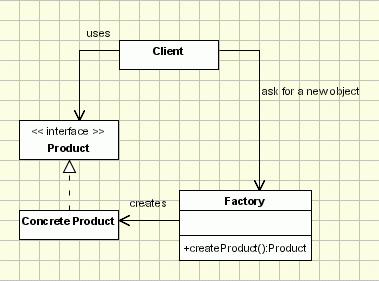
Factory pattern is based on idea instead of creating a new object with new operator, factory is asked, which returns a new instance. This is way standard Spring’s bean factory works. It may looks like following diagram (image is from oodesign.com):
Factory Pattern (click for source - oodesign.com)
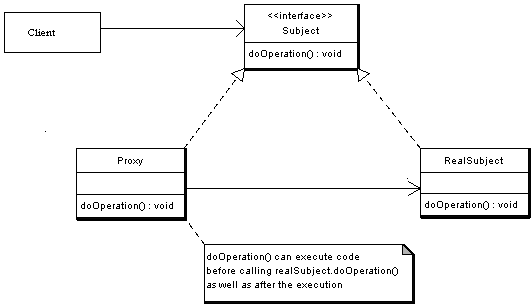
To hide newly created instance behind an interface facade Proxy pattern is used. This functionality is imho basic of AOP programming, because instead of calling original object, something else may be called. Have a look on following diagram (again from oodesign.com):
Proxy Pattern (click for source - oodesign.com)
Now it’s possible to put those patterns together and get real importAction functionality: importAction is just an interface, which hides importActionImpl newly created for every request. This can be seen on following snippet of application context configuration.
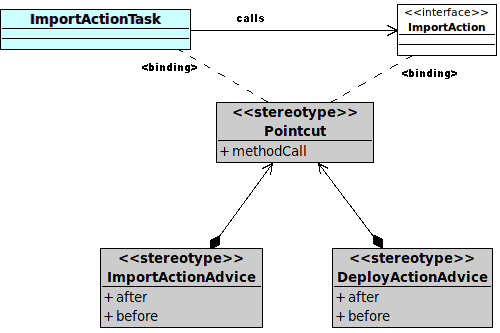
As I wrote a while before – all of this is done due to posibility of calling something else. But back to implementation, for details refer to some AOP documentation. Method importAction.invocateImportScript() is a pointcut, on which two advisors are bound. Have a look at following diagram.
ImportActionAdvice
This configuration can be achieved by NameMatchMethodPointcutAdvisor, see following snippet for ImportContentAdvisor bean definition and updated ImportAction itself:
Last few lines is definition of importActionTask I wrote in previous post. In this class importAction.invocateImportScript() method is called. This method has one parameter – map of properties of config file (in format <QName, Serializable>) to read them once and have them all the time and not need to call nodeService.getProperties() again and again – in advisors or importAction class. When this method is called, proxy of importAction catches this calling and calls invoke() method on ImportContentAdvice and DeployContentAdvice. Let’s have a look on invoke() method in ImportContentAdvice:
All what ImportActionAdvice does can be seen on previous snippet. It locks used config file to prevent access from another thread, using node uuid as a locking token. Then it authenticates a system user (mainImportThread runs outside any security context) and invocates next chain (DeployContentAdvisor and after then invocateImportScript(), if everything goes ok). After return from invocation lock is released and security context is cleared. If anything happens inside, lock release is skipped, so some rescue mechanisms are automaticaly initiated after some time. Simple, yet effective, i hope.
It has been some time since last post about import scripts from external sources to alfresco repository, I was busy with debugging and threading, but now I have some little time to write some notes on that topic again. I’d like to introduce „architecture“ of my solution, at least a first part of it, so … Pokračovat ve čtení „Import scripts architecture“
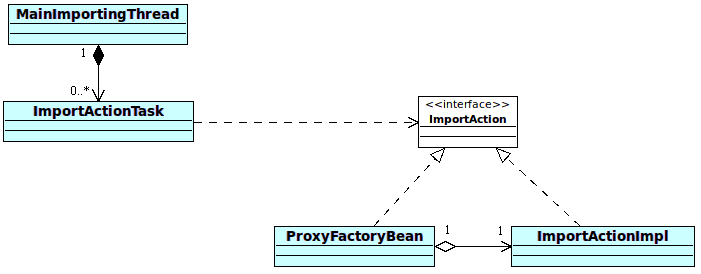
It has been some time since last post about import scripts from external sources to alfresco repository, I was busy with debugging and threading, but now I have some little time to write some notes on that topic again. I’d like to introduce „architecture“ of my solution, at least a first part of it, so lets start with an image.
Calling ImportAction
MainImportingThread is Runnable implementation, which is initiated on init. Main thread sleeps some time and searches for config files in repository, while not sleep. If found some, ImportActionTask instance is created for each config in separate thread. ImportActionTask checks, if is it possible to run script described by config. If so, run script method on ImportAction is executed. That’s in few words functionality of the first part. Now in more details.
First version used quartz jobs triggered by org.alfresco.util.CronTriggerBean every 10 seconds, but that was temporarily solution, too heavy in my eyes. In second version I tried to use BatchProcessor, but spent few days without got it worked as I want :-(. Finally I used ThreadPoolTaskExecutor with combination of java.lang.Runnable in main thread and it worked like a charm! As I wrote a while ago, MainImportingThread has its own separate thread, which cyclically looks for configuration files in repository. It looks like following snippet:
[code lang=“java“]
public void init() {
taskExecutor.execute(new Runnable() {
@Override
public void run() {
while(keepAlive) {
Thread.sleep(threadSleepMs);
For every row in result set PoolableObjectFactory creates a new instance of ImportActionTask and pass it to ThreadPoolTaskExecutor to execute. After all that – object is destroyed (destroyObject method is there just for sure – in time this method is called action still runs).
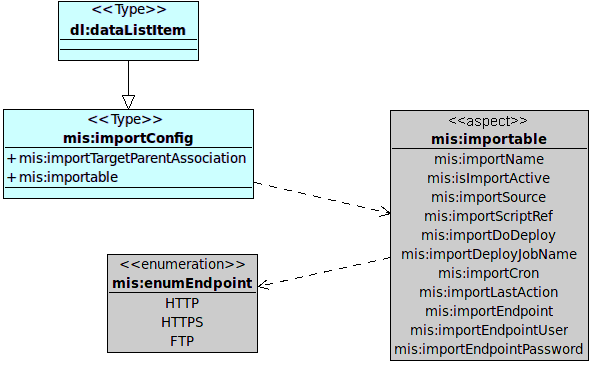
ImportActionTask is Runnable implementation, so every action runs its own thread. After execution isTimeToRun() method is called and action runs only when it’s its time and action is enabled, as it defined in data model illustrated on following diagram.
Config model
isTimeToRun() method uses fields importCron, importLastAction and isImportActive for its work. Its body looks similar to following simplified code snippet:
String cronString = model.getImportCron();
Date lastAction = model.getLastAction();
CronExpression cronExpression = new CronExpression(cronString);
if(cronExpression.getNextValidTimeAfter(lastAction).getTime() > System.currentTimeMillis())
return false;
return true;
}
[/code]
Previous snippet checks cron expression against time of last successfully executed action using org.quartz.CronExpression and in case of success (ie lastAction+cron < current time) importAction itself may be triggered. But more on this next time, right now just another snippet from ImportActionTask, which calls importAction (received from ProxyFactoryBean):
While creating import services I want some configuration mechanism for (not just) BatchProcessor. I like Alfresco’s *-config-custom.xml files (aka Spring framework XMLConfigService), so I did simple custom config service. Anyone, who customized Alfresco, knows format of this file (web-client-config-custom.xml). I put that structure to new file – mis-config-custom.xml: [code lang=“xml“] <alfresco-config> <config evaluator="string-compare" condition="imports"> <processor> … Pokračovat ve čtení „Custom configs in Alfresco“
While creating import services I want some configuration mechanism for (not just) BatchProcessor. I like Alfresco’s *-config-custom.xml files (aka Spring framework XMLConfigService), so I did simple custom config service.
Anyone, who customized Alfresco, knows format of this file (web-client-config-custom.xml). I put that structure to new file – mis-config-custom.xml:
Please note those constants are just for ilustration purposes now, more on them in scripting series. My MisConfigService extends org.springframework.extensions.config.xml.XMLConfigService, but uses nothing from that class (except init method in bootstrap), I just added some statics inside to keep things together:
[code lang=“java“]
public class MisConfigService extends XMLConfigService {
public MisConfigService(ConfigSource configSource) {
super(configSource);
}
public static String getChildValue(Config config, String elementId, String childName, String defaultValue) {
ConfigElement myConfig = config.getConfigElement(elementId);
String result = myConfig.getChildValue(childName);
return (result==null ? defaultValue : result);
}
public static Integer getChildValue(Config config, String elementId, String childName, Integer defaultValue) {
Integer result = defaultValue;
try {
String number = getChildValue(config, elementId, childName, defaultValue.toString());
result = Integer.parseInt(number);
} finally { /* O:-) */ }
return result;
}
. . .
}
[/code]
To instantiate this service just add bean definition with UrlConfigSource(-s), which defines path to custom xml configuration:
That’s all! And now for something completely different! I also spent some time trying to get properties files working and putting those properties into Spring configurations. There’s nice solved thread in Alfresco forums. Prefix helps:
<!– and I can use stuff from properties file with prefix –>
<bean class="foo.bar.Example">
<property name="fooAttribute">
<value>${mis:some.sample.property}</value>
</property>
</bean>
[/code]
In my last blogpost on this topic I wrote about invoking rhino scripts programatically from Alfresco and about passing its model into freemarker templates. After that I realized that alfresco templateService is unable to render more complex models (nested classes and collections) if called this way (please note on Alfresco webscripts invoked standard way this … Pokračovat ve čtení „More on invoking scripts in Alfresco“
In my last blogpost on this topic I wrote about invoking rhino scripts programatically from Alfresco and about passing its model into freemarker templates. After that I realized that alfresco templateService is unable to render more complex models (nested classes and collections) if called this way (please note on Alfresco webscripts invoked standard way this works correctly!). I think the problem is – no wrapper is used while passing model. I spent lot of time trying many things, read a lot of posts and topics on that, played with built-ins, trying to find that part in Alfresco source, but still no result, just exceptions. But solution is VERY SIMPLE – to write own templateService :-). Well, maybe this post is more about Freemarker and Rhino than Alfresco, sorry about that!
So, what I want to achieve? Suppose some simple script like this one:
Now after calling templateService.processTemplate( . . . ) the output is Exception this and Exception that… That happens, because Rhino creates NativeObjects for those objects and after passing those objects to Freemarker (through Java – without any ObjectWrapper), which doesn’t know how to handle them. The same situation happens when passing a collection with generics like <String, Object> into model – those Objects are standard Java objects and in Freemarker acts like them, they really don’t have attributes like q, a, b, etc. :-). Similar situation can happen with collections – they needs to be wrapped too. But stop with theory, back to practise. For those interested in wrapping and so, follow Freemarker documentation on wrappers.
Before wrapping – when I printed out keys of model, there were’nt my attributes defined in Javascript. What I found inside is on following listing, note my attributes are also there – bar, foo, arr, obj:
Those properties belongs to hashMap and is possible to get rid of them using simpleMapWrapper, this technique is described well in Rizwan Ahmed post.
What about my templateService implementation? First I tried to use JSONtoFmModel and convert javascript objects to strings, but that was no way forward. That was before I discovered wrappers :-). There is RhinoWrapper class in Freemarker and it solves all my problems! It can be used as simple as this:
[code lang=“java“]
Configuration cfg = new Configuration();
RhinoWrapper rhinoWrapper = new RhinoWrapper();
Previous listing creates new Freemarker configuration instance and rhino wrapper instance and binds them together. With that configuration it’s possible to create template instance, which takes reader with template content, let’s read it from repository:
[code lang=“java“]
NodeRef nodeRef = new NodeRef("workspace://SpacesStore/56ba2237-f776-494a-939b-d259b68c021a");
Template template = new Template("my_template", new InputStreamReader(inputStream), cfg);
[/code]
That’s all we need to render. Rendering takes one more parameter – model map, which is HashMap defined in my previous blogpost. To keep it simple (and post a little shorter) I’m writing output to sysout:
[code lang=“java“]
OutputStreamWriter streamWriter = new OutputStreamWriter(java.lang.System.out);
template.process(rootMap, streamWriter);
[/code]
Those few lines and everything works fine now! But I got some silver hairs with trying to solve that, now I can feel like a boss, so I achieved new „Alfresco guru badge“ :-). Also I’m thinking about some public GIT repository with my Alfresco inventions, what you think about it?
Like an Alfresco guru!
PostScriptum: Can anyone explain me why Alfresco uses Rhino version 1.6R7 which is from year 2007? :-O
I’m working on universal CRON runner, which runs scripts saved somewhere in repository (more on this next time). Running webscripts isn’t so easy, as I thought, there is no scriptService.runScriptWithThisDescription(path) method, so I did some research and got some results, which I’d like to share. It’s possible to run java backed actions from js-webscripts. Everything you … Pokračovat ve čtení „Invoking scripts in Alfresco programatically“
I’m working on universal CRON runner, which runs scripts saved somewhere in repository (more on this next time). Running webscripts isn’t so easy, as I thought, there is no scriptService.runScriptWithThisDescription(path) method, so I did some research and got some results, which I’d like to share.
It’s possible to run java backed actions from js-webscripts. Everything you need is just a bean extending ActionExecuterAbstractBase with definition parent=“action-executer“ and it’s possible to access that bean from webscript like actions.create(„that_bean_id“). But not in reverse, at least not so simple.
First think I found was post on forum and advice to look at unit tests of webscripts, but everything I found were invocations through http. So I went deeper and figured out that Alfresco uses Rhino JavaScript implementation for scripts. At Rhino pages are good examples, so I had first working script soon. At following codelist I firstly load content of node (script body) from repository and then invocate script itself.
[code lang=“java“]
NodeRef nodeRef = new NodeRef("workspace://SpacesStore/4a96aaaa-bb80-eeee-aaaa-800a43fcddb8");
ContentReader contentReader = contentService.getReader(nodeRef, ContentModel.PROP_CONTENT);
InputStreamReader isr = new InputStreamReader(contentReader.getContentInputStream());
BufferedReader reader = new BufferedReader(isr);
But I wanted something more – some model in and out and something simplier. So I found ScriptService. Now all those long lines can be ommited, because there is executeScript method!
[code lang=“java“]
Map<String, Object> model = new HashMap<String, Object>();
model.put("foo", "bar");
Object result = scriptService.executeScript(scriptRef, model);
[/code]
Template rendering (I’m using FreeMarker’s ftls) is done the same way, but through TemplateService and processTemplate(nodeRef, model) method, which accepts the same model (altered by script running).
The most beautiful thing is ability of script (and also template) to call java methods, which classes are „injected“ through model, let’s see an example.
[code lang=“java“]
Map<String, Object> model = new HashMap<String, Object>();
model.put("something", new Something());
model.put("bar", "foo");
Object result = scriptService.executeScript(scriptRef, model);
String templateResult = templateService.processTemplate("workspace://SpacesStore/noderef", model);
. . .
public class Something {
public String text = "aaa";
public String getText() {
return "bbb";
}
}
[/code]
Now it’s possible to use script / template:
[code lang=“javascript“]
(** script **)
bar = something.text;
What is output? Is in templateResult „aaa ?=? aaa“? Nope! Script accesses class attributes directly, on the other side template accesses methods. So output is „bbb ?=? aaa“!!!
One more important thing: this JavaScript implementation is just a stub, so every alfresco service needs to be „injected“ through model, so for example it’s impossible to run stuff like this without modifications:
[code lang=“javascript“]
var connector = remote.connect("http");
var result = connector.call("http://www.google.com/");
[/code]
Remote object has to be injected (this script is from Share/Surf), more on this in this blogpost. You have to add ScriptRemote to model and create spring-webscripts-config-custom.xml with endpoints defined, see that post. Also another services needs to be injected – to get access to repository, search service… good starting point is Alfresco Wiki.
Edit: Native Java API Access described in wiki is wrong, IT IS POSSIBLE to access maps in JavaScript like this:
[code lang=“javascript“]
var value = javaMap.key;
[/code]